Playwright Tutorial
Best Free Playwright Training Tutorial | Beginner To Advanced Level
What is Playwright
Playwright is a modern automation testing framework developed by Microsoft. It is used to automate and test modern web applications across multiple browsers.
Playwright allows testers and developers to perform cross-browser testing using a single API.
Why is Playwright popular
Playwright has become popular because of its modern features and reliable execution.
1. Cross-Browser Testing
Playwright supports multiple browsers with the same test script.
2. Fast Execution
Tests execute quickly compared to many traditional automation tools.
3. Parallel Execution
Multiple test cases can run simultaneously, reducing execution time.
4. Auto-Wait Mechanism
Playwright automatically waits for elements before performing actions.
5. Headless Execution
Tests can run without opening the browser UI, improving performance.
6. Multiple Language Support
Playwright supports:
- JavaScript
- TypeScript
- Java
- Python
- C#
7. Reliable Testing
Playwright provides stable and consistent test execution for modern applications.
Advantages of Playwright
- Easy to learn
- Faster execution
- Better handling of dynamic elements
- Supports modern web applications
- Built-in reporting and debugging features
How to launch a browser in Playwright
import { test, expect } from '@playwright/test';

test('My Test case 1', async ({ page }) => {

    await page.goto("https://logicnextgen.com/projects/logiccart/upload/");

     await page.waitForTimeout(20000);


});
How to handle Text Box in Playwright
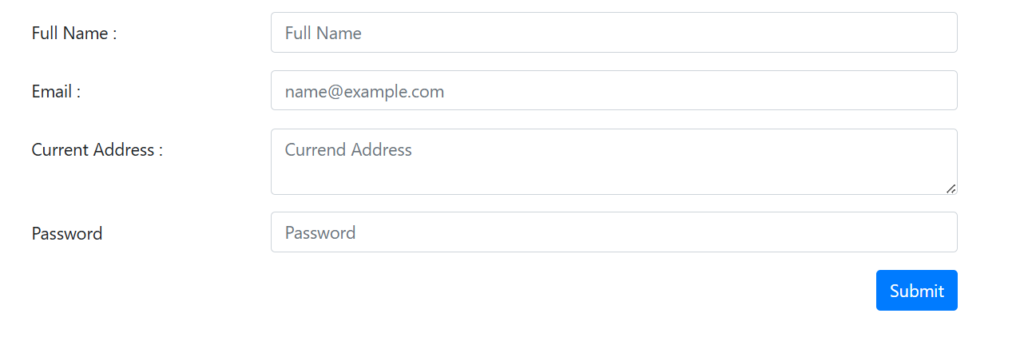
Text Box Practice Link: https://logicnextgen.com/projects/AutomationTestingPractice/textbox.php
import { test, expect, Locator } from '@playwright/test';

test('Text Box', async ({ page }) => {

    // Open URL
    await page.goto("https://logicnextgen.com/projects/AutomationTestingPractice/textbox.php");

    // Full Name
    const fullName: Locator = page.locator('#fullname');
    await fullName.fill('Keshav Kapoor');

    // Email
    const email: Locator = page.locator('#email');
    await email.fill('Keshav@gmail.com');

    // Current Address
    const address: Locator = page.locator('#address');
    await address.fill('Delhi, India');

    // Password
    const password: Locator = page.locator('#password');
    await password.fill('Keshav@123');

    // Wait
    await page.waitForTimeout(20000);

});How to handle Radio Buttons in Playwright

import { test, expect, Locator } from '@playwright/test';

test('Radio Button', async ({ page }) => {

    // Open URL
    await page.goto("https://logicnextgen.com/projects/AutomationTestingPractice/Radiobutton.php");

    // Select Male radio button
    const male: Locator = page.locator('#male');
    await male.check();

    // Wait for 5 seconds
    await page.waitForTimeout(5000);

    // Select Female radio button
    const female: Locator = page.locator('#female');
    await female.check();

    // Wait for 20 seconds
    await page.waitForTimeout(20000);

});
How to handle a checkbox in Playwright
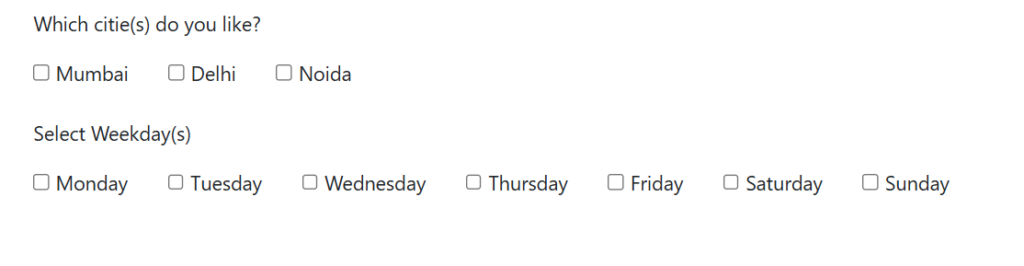
import { test, expect, Locator } from '@playwright/test';

test('Check Box', async ({ page }) => {

    // Open URL
    await page.goto("https://logicnextgen.com/projects/AutomationTestingPractice/checkbox.php");

    // Select Mumbai checkbox
    const mumbai: Locator = page.locator('#mumbai');
    await mumbai.check();

    // Wait
    await page.waitForTimeout(3000);

    // Select Delhi checkbox
    const delhi: Locator = page.locator('#delhi');
    await delhi.check();

    // Wait
    await page.waitForTimeout(3000);

    // Select Noida checkbox
    const noida: Locator = page.locator('#noida');
    await noida.check();

    // Final Wait
    await page.waitForTimeout(20000);

});How to handle a dropdown in Playwright
import { test, expect, Locator } from '@playwright/test';

test('Dropdown', async ({ page }) => {


    await page.goto("https://logicnextgen.com/projects/AutomationTestingPractice/dropdown.php");


    //1) Select State From Dropdown
    await page.locator('#state').selectOption('Rajasthan');

    // Wait for 5 seconds
    await page.waitForTimeout(5000);


    //2) check number of options in the dropdown(count)
    const dropdownOptions: Locator = page.locator('#state>option');
    await expect(dropdownOptions).toHaveCount(4);


    //3) check an option present in the dropdown
    const optionsText: string[] = await dropdownOptions.allTextContents();
    console.log(optionsText)
    expect(optionsText).toContain('Delhi'); // Check if the array contains "Delhi"


    //4) printing options from the drop down
    for (const option of optionsText) {
        console.log(option)
    }

    await page.waitForTimeout(20000);


});
How to Click a Button, Double-Click, and Right-Click in Playwright
import { test, expect, Locator } from '@playwright/test';
import { setTimeout } from 'node:timers/promises';

test('Buttons Clicks', async ({ page }) => {

    await page.goto("https://logicnextgen.com/projects/AutomationTestingPractice/buttons.php");

    //Simple Button Click
    const simpeclcik1 = await page.locator('#singleBtn');
    simpeclcik1.click();

    // Wait for 5 seconds
    await page.waitForTimeout(5000);


    // Double Click
    const doubleBtn1 = await page.locator('#doubleBtn');
    doubleBtn1.dblclick();


    // Wait for 5 seconds
    await page.waitForTimeout(5000);


    //Right Click
    const rightBtn1 = await page.locator('#rightBtn');
    rightBtn1.click({ button: 'right' });


    // Wait for 5 seconds
    await page.waitForTimeout(5000);


});
How To Perform Mouse Hover In Playwright
import { test, expect, Locator } from '@playwright/test';

test('My Title', async ({ page }) => {


    await page.goto("https://logicnextgen.com/projects/AutomationTestingPractice/mousehover.php");

    const pointme = page.locator('#MouserHover1');
    await pointme.hover();
    await page.waitForTimeout(20000);

});