1. What is Page Object Model (POM)?
Page Object Model is a design pattern in Selenium automation where each web page is represented as a separate class.
The class contains:
- Web elements of the page
- Methods to perform actions on those elements
It helps improve:
- Code reusability
- Maintainability
- Readability
2. Why do we use POM in Selenium?
POM is used to:
- Reduce code duplication
- Separate test logic from page elements
- Make framework easy to maintain
- Handle UI changes easily
- Improve scalability of automation framework
3. What are the main components of POM?
Main components are:
- Page Class → Contains locators and methods
- Test Class → Contains test cases
- Object Repository → Stores web element locators
4. What are the advantages of POM?
Advantages:
- Better code organization
- Easy maintenance
- Reusable methods
- Improved readability
- Reduced duplication
- Easy debugging
5. What are the disadvantages of POM?
Disadvantages:
- Initial setup takes time
- More classes need to be created
- Not suitable for very small projects
6. How does POM improve maintainability?
If a locator changes in UI, we update it only in the Page Class instead of updating in all test cases.
7. What is Page Factory in Selenium?
Page Factory is an inbuilt Selenium class used to implement POM easily using annotations like @FindBy.
Example:
@FindBy(id="username")
WebElement userName;
8. Difference between POM and Page Factory?
| POM | Page Factory |
| Uses normal findElement() | Uses @FindBy annotations |
| Elements initialized manually | Elements initialized automatically |
| More coding required | Less coding required |
| Slower compared to Page Factory | Faster initialization |
9. What is the use of @FindBy annotation?
@FindBy is used to locate web elements in Page Factory.
Example:
@FindBy(xpath="//input[@id='email']")
WebElement email;
10. What is PageFactory.initElements()?
It initializes all web elements present in the Page Class.
Example:
PageFactory.initElements(driver, this);11. How do you create a Page Class in POM?
Example:
public class LoginPage {
   WebDriver driver;
   @FindBy(id="username")
   WebElement username;
   @FindBy(id="password")
   WebElement password;
   @FindBy(id="login")
   WebElement loginBtn;
   LoginPage(WebDriver driver){
       this.driver = driver;
       PageFactory.initElements(driver, this);
   }

   public void login(String user, String pass){
       username.sendKeys(user);
       password.sendKeys(pass);
       loginBtn.click();
   }
}
12. What is the role of constructor in POM?
Constructor is used to:
- Initialize WebDriver
- Initialize web elements using PageFactory
13. Why should test data not be stored in Page Classes?
Page Classes should only contain page elements and methods.
Test data should be stored separately for better maintainability.
14. Can we use POM without Page Factory?
Yes.
We can implement POM using normal findElement() methods without using Page Factory.
15. What is the difference between Page Class and Test Class?
| Page Class | Test Class |
| Contains locators and methods | Contains test cases |
| Represents webpage | Executes validations |
| Reusable | Uses page methods |
16. How does POM support reusability?
Common methods like login, click, search, etc. can be reused across multiple test cases.
17. What type of framework commonly uses POM?
POM is commonly used in:
- Hybrid Framework
- Data-Driven Framework
- Keyword-Driven Framework
18. What are best practices in POM?
- Keep locators private
- Use meaningful method names
- Avoid hard coding
- Use reusable methods
- Maintain separate test and page classes
19. What is Object Repository in POM?
Object Repository is a place where all web element locators are stored.
Example:
@FindBy(id="login")
WebElement loginBtn;
20. How do you handle dynamic elements in POM?
Dynamic elements can be handled using:
- Dynamic XPath
- Explicit waits
- Relative locators
Example:
@FindBy(xpath="//button[contains(text(),'Login')]")
WebElement loginBtn;
21. Can POM be used with TestNG?
Yes.
POM is commonly integrated with TestNG for test execution, assertions, and reporting.
22. Why is POM considered a good design pattern?
Because it follows:
- Separation of concerns
- Encapsulation
- Reusability
- Maintainability
23. What is encapsulation in POM?
Web elements are hidden inside Page Classes and accessed only through methods.
Example:
public void clickLogin(){
   loginBtn.click();
}
24. How do you manage waits in POM?
Waits are usually implemented inside page methods using Explicit Wait.
Example:
WebDriverWait wait = new WebDriverWait(driver, Duration.ofSeconds(10));
wait.until(ExpectedConditions.visibilityOf(loginBtn));
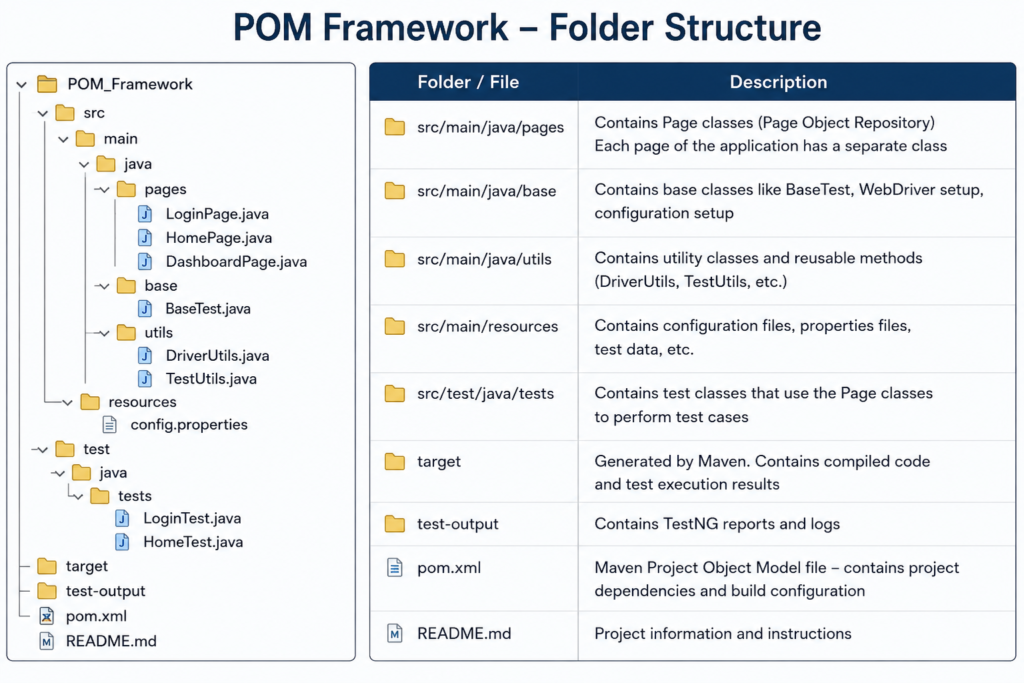
25. What is the folder structure in a POM framework?
Typical structure:
src/test/java
├── pages
├── tests
├── utilities
├── base
└── reports
26. How do you handle multiple pages in POM?
Create separate Page Classes for each webpage.
Example:
- LoginPage.java
- HomePage.java
- CartPage.java
27. What is Base Class in POM framework?
Base Class contains common setup code like:
- Browser launch
- Driver initialization
- Wait setup
- Common utilities
28. What are reusable methods in POM?
Methods that can be used multiple times across tests.
Example:
click()
sendKeys()
selectDropdown()
29. How is POM useful in large projects?
In large projects:
- UI changes happen frequently
- Multiple testers work together
- Reusable components are needed
POM helps manage all these efficiently.
30. Explain real-time usage of POM.
In real projects:
- Every page has separate class
- Test cases call page methods
- Framework becomes modular and scalable
- Maintenance becomes easier when UI changes occur